

On this page
Google Search Ads work for contractors who run them right. The problem is that the average unmanaged contractor campaign loses 35 to 60 percent of its budget to clicks from job seekers, DIY searchers, and people outside the service area before a single qualified call comes in. This guide covers how to build a campaign that brings in booked jobs, not browser traffic, and how to cut the waste without pausing your spend.
Quick Answer
- Google Search Ads outperform Local Services Ads for planned, high-value contractor jobs like kitchen remodels and HVAC system replacements because you control the keywords, the landing page, and the bid strategy.
- The biggest source of wasted contractor ad spend is not high CPC; it's irrelevant clicks from job seekers, supply buyers, and DIY searchers, which a structured negative keyword list eliminates in the first week.
- Before setting a budget, calculate your maximum cost per lead by dividing your average job value by four. That number is your profitability ceiling, and it tells you whether your current CPC is sustainable or not.
Why Contractor Google Ads Campaigns Bleed Budget Before the Phone Rings
You can launch a Google Ads campaign in an afternoon. The real problem is that most contractor campaigns launch with broad keyword targeting and no negative keyword list, which means Google shows your ad to anyone who types a phrase containing your trade. In practice, a plumber spending $2,000 a month with no negative keywords will pay for clicks from people searching for plumbing jobs, plumbing supply wholesalers, and DIY drain cleaning tutorials. None of those searches end in a phone call.
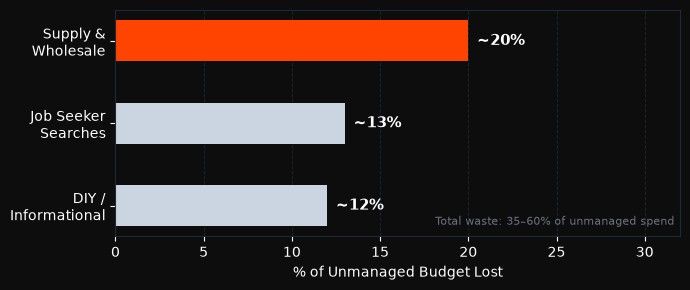
The waste is structural, not random. Three click types account for most of the budget loss.
The Three Click Types That Bill You Without Booking You
Supply and wholesale intent. Searches like "copper pipe wholesale" or "HVAC equipment supplier" have commercial intent, but the buyer is a trade professional looking for materials, not a homeowner looking for a contractor. Your ad appears because your keywords match, but the person clicking has no intention of hiring you.
Job seeker intent. In any trade, a meaningful share of searches for "electrician" or "HVAC technician" come from people who want to become one, not people who want to hire one. Adding "jobs," "career," "certification," and "salary" as negatives is the baseline. What most guides skip is the subtler layer: terms like "how much does an electrician make" or "HVAC apprentice program" that don't contain obvious job-intent signals.
DIY and informational intent. A homeowner searching "why is my toilet running" or "fix leaking pipe" wants a diagnosis or a YouTube video, not a bill. These clicks come from people who would fix it themselves if they could. They cost you real money and produce zero leads.
Why Contractor CPCs Run $15 to $50 and When That Math Still Works
Contractor keywords in competitive markets can cost $15 to $50 per click according to WordStream's 2024 Google Ads industry benchmarks for home services, which sounds expensive until you run the job-value math. A general contractor with an average job value of $8,000 and a close rate of one in four can afford to pay up to $2,000 per booked job. At a landing-page conversion rate of eight percent, that's $25 per click before profit disappears, which sits comfortably inside even aggressive CPC ranges for most metro markets.
The math breaks when you're paying that $30 CPC for the job seeker clicks, supply searches, and how-to queries described above. Those clicks cost the same amount but return zero. Fix the targeting first, then evaluate whether your CPCs are actually too high.
Google Search Ads vs Local Services Ads for Booked Contractor Jobs
Both ad types can generate leads. They don't reach the same buyer at the same moment, and the contractors who try to replace one with the other almost always leave money on the table.
Local Services Ads (LSAs) appear above Search Ads, above the map pack, and above organic results. They charge per lead, not per click, and they work best when the buyer's intent is urgent and location-specific: "24 hour plumber near me," "emergency HVAC repair," "electrician open now." The buyer is ready to call whoever answers first.
What Search Ads Reach That LSAs Miss
Search Ads appear below LSAs, but they cover a different part of the funnel. The buyer is researching a planned project. "Kitchen remodel contractor Denver," "whole-house rewiring quote," and "HVAC system replacement quote" are all planned-project queries. These buyers are comparison-shopping, reading reviews, and building a shortlist. LSAs give them a phone number. Search Ads give you the chance to send them to a landing page that explains your process, shows past projects, and captures their details with a contact form before they call three other contractors.
Planned-project leads from Search Ads also close at higher rates because the buyer has done more research before contacting you. Emergency calls from LSAs are higher-volume, lower-average-value, and often more price-sensitive.
Running Both Without Cannibalizing Your Budget
The simplest split: use LSAs to capture urgent calls and Search Ads to win the planned-work pipeline. Set your LSA budget to cover your estimated emergency call volume. Run Search Ads separately for your highest-value services. Keep the campaign objectives and bidding strategies completely separate: use a Leads objective on Search with a lead form and an LSA account managed through the Local Services dashboard. They don't compete for the same impression; they address different searches.
The 3-Layer Negative Keyword Framework for Contractor Campaigns
Most Google Ads guides for contractors list a few obvious negative keywords ("jobs," "free," "DIY") and stop there. In a live Search campaign, that level of coverage typically eliminates five to fifteen percent of irrelevant clicks. The 3-Layer Negative Keyword Framework covers the full intent spectrum that wastes contractor budgets, organized by the reason each search will never convert. Applied in the first week of a campaign, it consistently reduces wasted spend by 25 to 40 percent without reducing lead volume, because none of the blocked searches would have converted. The three layers correspond to three distinct intent types: commercial intent for trade professionals (not homeowners), informational intent from people who plan to solve the problem themselves, and geographic and trade mismatch intent from searches that don't match what you do or where you work.
Job Seekers and Supply-Chain Searches
Add every variation of employment intent as negatives: jobs, job, career, careers, salary, wage, pay, apprentice, certification, license requirements, how to become, training program, courses. Then add supply and wholesale intent specific to your trade. For plumbers: pipe wholesale, supply warehouse, fittings bulk, plumbing supply store. For electricians: wire wholesale, electrical supply, breaker panel wholesale. For HVAC: equipment supplier, refrigerant wholesale, commercial HVAC parts.
These searches have real commercial intent, but not from homeowners. They will never convert, and they can consume 15 to 25 percent of an unmanaged contractor budget in dense metro areas where trade professionals are actively searching.
DIY and Informational Intent
Build a list of DIY-intent signals specific to your trade. "How to," "fix yourself," "tutorial," "DIY," "step by step," "without a plumber/electrician/HVAC tech," "can I," "is it safe to" are the top-level terms. Go one level deeper by building a keyword strategy for Google Search that includes the specific DIY searches in your trade: "clear clogged drain myself," "replace light switch," "recharge AC unit myself," "fix roof shingles," all real searches that trigger contractor ads under broad and phrase match.
These informational searches destroy conversion rates because the intent is to avoid hiring you, not to find you.
Out-of-Service-Area and Wrong-Trade Searches
Geo-targeting limits where your ads show by geography, but it doesn't eliminate queries that include location names outside your area. Someone in your city searching "HVAC contractor Phoenix" (if you're in Dallas) can still see your ad under some match configurations. Add out-of-area city and neighborhood names as negatives, and add adjacent-trade terms that get conflated with yours: if you're a general contractor, add "subcontractor," "specialty contractor," "commercial contractor" (if you only do residential), and "handyman" if your ticket sizes don't align.
Eliminating wasted ad spend without stopping your campaigns means applying these layers systematically. Review how to remove wasted spend without pausing campaigns for the exact process once your negative list is built.
How to Calculate Your Maximum Cost Per Lead Before Spending a Dollar
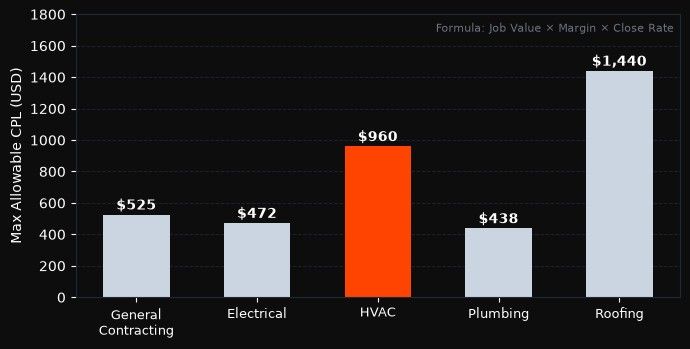
The Contractor CPL Formula gives you a hard ceiling for what you can pay per lead and still profit. Start with your average job value for the service you're advertising. Multiply it by your gross margin percentage to get margin per job. Then multiply by your close rate (how many leads you typically convert to booked jobs). The result is your maximum allowable cost per lead. A roofing contractor with a $12,000 average job, 40 percent gross margin, and a 30 percent close rate can afford ($12,000 x 0.40 x 0.30) = $1,440 per lead before the campaign stops being profitable. That number is your campaign guardrail. Any cost per lead below $1,440 is working for you, and any campaign change that pushes above it needs justification before it runs.
Run this calculation before you set a budget, not after you've spent $3,000 and are reviewing whether it worked. The formula forces you to connect the campaign to real business outcomes, which also makes it easier to evaluate whether a $40 CPC is expensive or cheap for your specific trade and market.
CPC Benchmarks by Trade in 2026
These are observed ranges for U.S. metro markets in 2026, on Google Search with phrase and exact match:
| Trade | Low CPC | High CPC | Notes |
|---|---|---|---|
| Plumbing | $12 | $45 | Emergency terms run higher |
| HVAC | $15 | $55 | Seasonal peaks push CPCs up significantly |
| Electrical | $10 | $40 | Commercial electrical runs lower volume |
| Roofing | $8 | $35 | Storm-season spikes common |
| General contracting | $5 | $25 | High variability by project type |
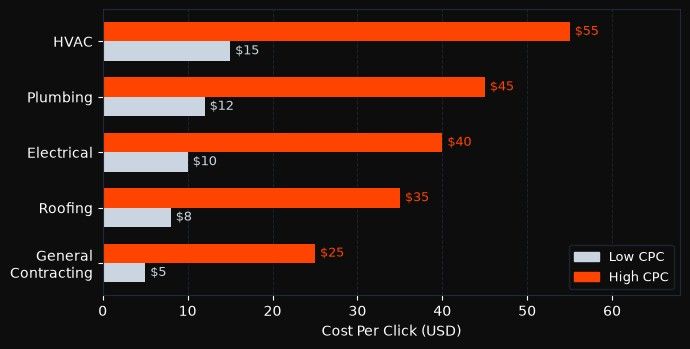
These ranges widen significantly in top-10 metro markets (New York, Los Angeles, Dallas, Chicago) and compress in smaller markets. Source: WordStream Google Ads Industry Benchmarks, 2024 update. Before committing a budget, look at your impression share lost to budget or rank after the first two weeks. That number tells you whether your budget is limiting lead volume or whether you have structural issues.
Understanding cost per acquisition in this context means treating every unbooked lead as part of your cost model, not just every booked job. Your CPL ceiling accounts for both.
Author's Comment
"I built acquisition systems at two companies before Hellyeah, and the pattern that kills contractor campaigns is always the same: they launch with broad keywords and no negative list, then blame Google when the results don't come. The waste isn't in the CPC. It's in paying $25 for a click from someone who searched 'plumbing apprentice program.' The signal processing layer needs to filter that out before the first dollar is spent, not after the third month of reviewing search term reports."
Jay Ma, Co-Founder, Hellyeah AI
4 Campaign Rules That Separate Booked Jobs from Wasted Clicks
How you structure a campaign determines how much control you have over where your budget goes. A single campaign covering all your services, with broad match keywords and automatic bidding from day one, gives Google maximum discretion. In competitive local markets, that discretion produces a mix of relevant leads and irrelevant clicks that takes months of data to correct.
One Campaign Per Service Line, Not One Campaign for Everything
A plumber who runs "plumbing" as a broad match keyword in a single campaign will get impressions for drain cleaning, water heater installation, bathroom remodel plumbing, and emergency burst pipe calls in the same campaign. Those four service types have different job values, different conversion rates, different seasonal patterns, and different acceptable CPLs.
Separate them. Run one campaign for emergency/repair calls (bid higher, shorter radius, call-only or responsive search ads). Run a second campaign for planned installation work (longer keyword lists, landing pages, lead forms). This separation lets you improve your Quality Score and lower CPC in each campaign because the keyword-to-ad-to-landing-page match is tighter, and it lets you adjust bids per service type based on real margin data.
Keyword Match Type Discipline for Local Queries
Start with phrase match and exact match only. In a local service account, broad match expands to queries you haven't approved and won't catch until you review the search term report. Phrase match for "emergency plumber" will capture "emergency plumber near me," "24 hour emergency plumber," and "emergency plumber downtown," which are all relevant. It will not expand to "what causes emergency plumbing" or "plumbing emergency cost estimate," which are not.
Add responsive search ad best practices for small budgets to your campaign structure, and in particular pin the keyword in position 1 of your headline so Google doesn't rotate it out when testing combinations.
Ad Copy That Pre-Qualifies Before the Click
Your ad copy is your first filter. Include license number, the word "licensed," and your service area in the description. Mention the job types you take: "kitchen and bathroom remodels," "full HVAC system replacement," "whole-house electrical upgrades." This reduces curiosity clicks from people who weren't sure whether you handle their job type, and it signals to qualified buyers that you're the right match. Every click that a non-buyer didn't make is money still in your account.
How Do You Track Contractor Leads From Google Ads Without Losing the Signal?
Most small contractor businesses track results by counting how many calls they get in a month. That's the wrong unit of measurement for a Google Ads campaign because it doesn't tell you which calls came from which keyword, which ad, or which campaign. Without that signal, you can't optimize. More critically, without 30+ conversion events in a 30-day window, Google's Smart Bidding options can't learn which search intent converts, which means automated bidding is guessing rather than learning.
Phone Call Tracking as the Primary Conversion Event
Set up a Google forwarding number in your campaign. This is free inside Google Ads and creates a conversion event every time someone calls your business from the ad. Set the minimum call duration to 30 or 60 seconds to filter hangups and robocalls. A 10-second call is not a lead.
Once call tracking is running, every phone conversion is attributed to the exact keyword and ad that produced it. After four to six weeks of data, you can see which service terms produce calls (and keep them), which produce clicks but no calls (and reduce bids or pause), and which produce calls that never book (a sales process issue, not a campaign issue).
Lead Form Ads That Skip the Landing Page Entirely
Contractors without a high-converting landing page have a practical alternative: Google Lead Form extensions. These are built-in forms that appear directly in the search results. A homeowner clicks on your ad, fills out name, phone number, and job description inside Google's interface, and their information arrives in your lead management system without ever visiting your website.
For the Leads campaign objective on Google Search, Hellyeah's platform captures these lead form submissions directly in the dashboard, so you see every inquiry without building or maintaining a separate landing page. This is the fastest path to leads for contractors whose website is a basic homepage or isn't optimized for conversions. You can review auditing your Google Ads account for a checklist of what to assess before switching to a lead form setup.
How Hellyeah Runs Google Search Campaigns for Contractors Without the Manual Work
Running a Google Search campaign well requires weekly attention to search term reports, bid adjustments, negative keyword additions, ad copy testing, and Quality Score management. In a live campaign, that work takes three to five hours a week if you do it properly, which is time most contractors don't have while also running a crew.
Hellyeah's Google Ads campaigns on the Search objective handle that operational layer through Hellyeah's AIMA engine. You connect your ad account, set your service categories and location, and AIMA builds the campaign structure, writes the initial ad copy, manages bids, and prunes the keyword list as conversion data accumulates. Hellyeah's AIMA engine runs on the same platform used by growth teams managing $50K+ in monthly media spend. For a contractor, the difference is that the intelligence is applied to a local service account, not a national campaign.
What AIMA Handles Automatically
AIMA monitors your search term report continuously and adds negative keywords as irrelevant searches appear. It adjusts bids per keyword cluster based on which queries produce call conversions, shifts budget toward the service lines performing above your target CPL, and tests ad copy variations until it identifies which headline combinations generate the highest call rates. The Google Ads automation tools built into the platform also include automated rules that cut wasted spend when daily spend velocity outpaces conversion rate.
How Leads Arrive in Your Dashboard
When a homeowner submits a lead form or calls from your Search Ad, the inquiry appears in your Hellyeah dashboard with the source keyword, the ad that triggered it, and the contact details. You don't need a separate CRM or call tracking service for this to work; it's built into the platform. You can assign a status to each lead, track which ones book, and see your actual CPL calculated from real booking data, not from estimated click rates. This is how you reduce your cost per customer over time, connecting campaign spend to booked revenue, not just to call volume.
Frequently Asked Questions About Google Ads for Contractors
Should contractors use Local Services Ads or Google Search Ads? Use both if your budget allows, targeting different buyer intent with each. Local Services Ads capture urgent, same-day calls and charge per lead. Google Search Ads target planned-project buyers and give you control over keywords, ad copy, and landing pages. For high-value jobs like HVAC replacement or roof installation, Search Ads tend to produce better-qualified leads because buyers research before calling.
How much should a contractor spend on Google Ads per month? A monthly budget of $1,500 to $3,000 generates enough data in most U.S. markets, based on Google Ads minimum budget guidance and home-services account data from WordStream's 2024 Google Ads benchmarks. Below $1,000, you won't accumulate enough clicks to reach the 30-conversion threshold Google needs to optimize Smart Bidding. Above $3,000, you should be running separate campaigns per service line and tracking CPL per campaign, not as a blended average.
How long does it take to see leads from Google Ads? The first calls typically arrive within the first week of a live campaign. The first month of data is noisy, so expect a mix of relevant and irrelevant clicks while your negative keyword list builds. By week four to six, your search term report should show a clean pattern of converting queries, and your CPL should be falling as irrelevant clicks are eliminated.
What's the most common reason contractor Google Ads don't produce leads? Poor keyword coverage paired with no negative keyword list. A contractor targeting "plumber" or "electrician" under broad match is paying for every related search Google decides to match, including job listings, supply searches, and DIY tutorials. The fix is switching to phrase and exact match, building the 3-Layer Negative Keyword Framework from week one, and checking the search term report every seven days for the first month.
Can I run Google Ads without a website? Yes, using Google Lead Form extensions. These forms appear inside the search results, collect the homeowner's name, phone number, and job description, and send the lead to your management system without a website visit. This is the fastest way to start generating leads if your website isn't set up for conversions.
Related blog posts

Co-founder
Co-founder of Hellyeah. Writes about building durable growth loops that compound over time.


