

On this page
Most RSA guides are written for accounts spending $10,000 a month or more. The advice is correct at that scale: max out your assets, let Google test thousands of combinations, optimize based on statistically reliable winners. The problem is that strategy requires volume. On a $500 or $1,500 monthly budget, you're not running thousands of combinations. You're running a handful per week, and Google's algorithm needs data you don't have yet.
RSA best practices for small budgets aren't different in principle. The sequencing matters more. Some optimizations that work well at scale actively waste time on small accounts because you never collect enough data to see the effect.
Quick Answer: Write 8-10 headlines in distinct categories: keyword-match, benefit, trust signal, CTA, and objection-handling. Pin only legally required or brand-critical copy. Don't read the combinations report until you have 200+ impressions per RSA. Build your negative keyword list before touching asset ratings. Stay on Maximize Clicks until you hit 30 monthly conversions, then test Target CPA.
What Are Responsive Search Ads?
Responsive search ads (RSAs) give you up to 15 headlines (30 characters each) and 4 descriptions (90 characters each). Google's algorithm tests different combinations of these elements across impressions and, over time, learns which pairings drive the best results for different searches, audiences, and devices.
Up to 3 headlines and 2 descriptions appear in any single impression. Google decides which headlines appear, in which positions, and alongside which descriptions. You supply the raw material. The algorithm handles selection and testing.
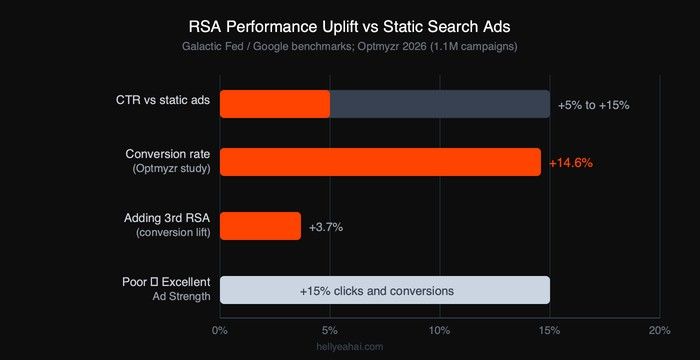
RSAs replaced expanded text ads as Google Ads' only supported search ad format in June 2022. That shift wasn't reversible. In 2026, every Google Ads account running search campaigns uses RSAs by default. According to data cited by Galactic Fed from Google's own benchmarks, RSAs generate 5 to 15% higher click-through rates than static search ads on the same queries. Research from Optmyzr analyzing 1.1 million RSA campaigns over 24 months found a 14.6% conversion rate advantage over legacy expanded text ads.
Why RSAs Are Harder to Optimize on a Small Budget
Google's RSA algorithm learns from volume. The more impressions, clicks, and conversions your ad accumulates, the better its predictions about which combinations perform. On accounts spending $50 to $100 per day, that volume takes time to build.
A single RSA generating 1,500 impressions per month, which is realistic for a $30/day budget, takes roughly seven months to cross the 10,000-impression threshold where asset ratings become reliably meaningful. An account at $300/day crosses the same threshold in three to four weeks.
This isn't a flaw in Google's system. RSAs were designed for volume. The fix for small budgets isn't to skip best practices, it's to sequence them correctly. Structural work, including headline variety, negative keywords, and match type discipline, should happen first. Volume-dependent optimizations, including asset rating analysis, combinations report interpretation, and bidding strategy refinement, should wait until the data exists.
What most small-budget guides miss: there's a specific order of operations. Get the raw materials right. Block wasted spend. Then optimize. Reversing that sequence produces months of small adjustments with no measurable result.
How to Write Headlines That Cover All Three Positions
Google can show up to 3 headlines per impression, in positions 1, 2, and 3. The goal is writing a set of headlines where any combination Google chooses produces a coherent, compelling ad. Headlines that contradict each other, restate the same message, or create awkward pairings are a structural problem no amount of bidding or optimization will fix.
Five headline categories that cover every position:
Keyword-match headlines include the primary keyword as searched. They build expected CTR and ad relevance, two of the three Quality Score components. Write 2-3 of your total headlines in this category, with slight phrasing variations to give Google flexibility.
Benefit headlines state a specific outcome, not a feature list. "Cut wasted ad spend in 30 days" is a benefit. "Advanced campaign management tools" is a feature. Write 2-3 benefit headlines covering different buyer motivations: cost savings, time efficiency, revenue impact.
Trust and proof headlines include a differentiator, a client result, a certification, or a guarantee. They perform differently from benefit headlines and give Google a third testing angle. Write 1-2.
CTA headlines ("Book a Demo," "See Your Ad Score," "Get Started Today") should be limited to 1-2. CTA headlines in position 1 tend to underperform against cold traffic; they work better in positions 2 or 3 paired with a benefit or keyword headline.
Objection-handling headlines pre-empt concerns: "No Long-Term Contracts," "Cancel Anytime," "No Setup Fees." These reduce friction at the decision stage and are especially effective in position 3.
The non-negotiable rule: no two headlines should say the same thing in different words. "Scale Your Campaigns" and "Grow Your Ad Revenue" are functionally identical. Remove one. The algorithm tests both and learns nothing from comparing them. Distinct messages, tested against each other, produce learning. Rephrased versions of the same message produce noise.
How Pinning Affects RSA Learning on Small Accounts
Pinning locks a specific headline to a specific position on every impression. Every pinned position reduces the number of combinations Google can test. On accounts where impressions are already limited, aggressive pinning makes the algorithm's learning problem worse without proportional benefit.
Pinning makes sense when legal disclaimers must appear in a specific position, when a brand name needs to anchor position 1 for trademark clarity, or when a time-sensitive offer cannot be buried in position 2 or 3.
Pinning doesn't make sense when you want your best-performing benefit headline to "always show." If it's genuinely better, Google surfaces it organically in position 1 once it has signal. Pinning it prevents that testing from happening. Pinning position 2 or 3 alongside position 1 locks two of three headline slots. At low impression volume, that means nearly zero variety in the combinations Google can test.
The most common mistake on small accounts: pinning position 1 to the keyword headline and position 2 to the main benefit, then wondering why the combinations report shows no variety. Both pins are unnecessary. The algorithm would have surfaced those headlines in those positions anyway, once it learns which pairings convert. Unpin everything except genuinely required copy and let the algorithm work with the full set.
How to Read the Combinations Report Before Pausing Assets
The combinations report shows which headline and description pairings Google has actually served and how they performed. It's the most actionable view in the RSA interface. To access it: click on the RSA in your Ads view, then Asset details, then the Combinations tab.
High-impression combinations with low CTR are your primary problem signal. The specific pairing Google keeps serving is underperforming. Before pausing any headline involved, check search terms first. The pairing may be getting served against irrelevant queries, which is a targeting problem, not a copy problem.
Low-impression combinations with high CTR are underexplored winners. Google hasn't served them frequently, but when it has, they clicked. Check whether headlines in these combinations are being held out by pins elsewhere.
Combinations with zero impressions usually indicate too many pins or too many similar headlines that Google treats as redundant. Remove duplicate messages and review all pins.
The critical threshold: don't read the combinations report until an RSA has at least 200 to 300 impressions. Below that, a single click changes the CTR column by several percentage points. Acting on a combinations report with 80 total impressions is acting on noise.
How Much Volume Do You Need Before Acting on RSA Data?
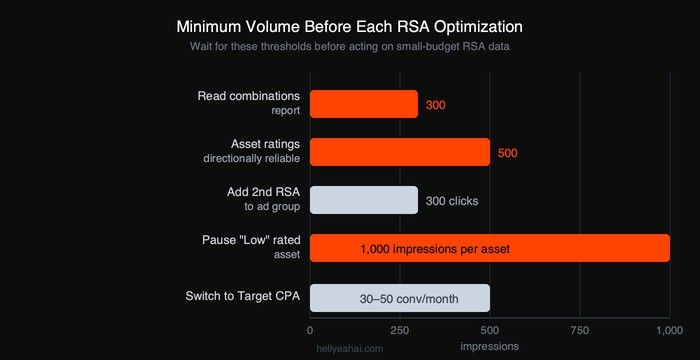
This question almost never appears in RSA guides written for large accounts because at $300/day, the volume thresholds are hit within weeks. At $30/day, some take months. Knowing when you have enough data prevents optimization decisions that look confident but have no statistical basis.
A "Low" rated headline with 200 impressions behind it is not confirmed underperformance. That's an early estimate from fewer than five days of data on a typical small account. Removing it restarts the asset pool with an untested replacement. Do that repeatedly and you accumulate a history of inconclusive tests rather than genuine learning.
| Decision | Minimum impressions | Why |
|---|---|---|
| Reading asset ratings | 500+ per RSA | Ratings shift significantly week to week below this |
| Pausing a "Low" rated asset | 1,000+ per asset | Premature removal eliminates untested headlines |
| Trusting combinations report | 200-300 per combination | Single-click variance is meaningless below this |
| Adding a 2nd RSA | 300+ clicks in the group | Below this, two RSAs split signal too thin |
| Switching to Target CPA | 30-50 conversions/month | Learning period stability requires this floor |
Running at 800 impressions per month per RSA? The first two thresholds take most of a year to reach. That's not a failure of the account. It's what low-budget account management actually looks like. The error is making optimization calls before the data exists to support them.
What to do during the accumulation period: review impressions weekly to confirm ads are serving, check for disapprovals, review search terms for wasted spend and add negatives, check ad scheduling to confirm spend concentrates in your peak conversion windows. Don't touch headlines.
Why Negative Keywords Are Budget Protection on Small Accounts
On a $30/day budget, a single irrelevant query cluster can consume 15 to 20% of daily spend before you notice. Negative keywords prevent that. On small accounts, negative keyword management generates more value per dollar than on large ones because the margin for wasted spend is narrower.
Build your negative list before your RSA goes live. Start with your industry's irrelevant query patterns. B2B software companies should negate "free," "tutorial," "DIY," "how to," and job-intent terms. Local service businesses should negate out-of-area city modifiers and generic category queries with no purchase intent.
Mine the search terms report weekly, not monthly. Go to Keywords, then Search Terms. Sort by cost, descending. Every query that generated clicks without conversions is a negative keyword candidate. Add the worst offenders immediately. After four to six weeks of active negative keyword management, click-to-conversion rate on remaining queries should improve visibly.
Match type discipline matters more at low budgets. Broad match, now Google Ads' default as of 2026, matches your ads to semantically related queries. For large accounts on Target CPA with strong conversion history, broad match is appropriate. On a small budget with limited conversion data, broad match can be a continuous budget drain. Start with Exact or Phrase Match for your core terms. Switch to Broad Match after you have 30 or more monthly conversions and a stable Target CPA.
Build a shared negative keyword list in Tools, then Shared Library, then Negative Keyword Lists. Apply it to all campaigns. Queries that waste budget in one campaign nearly always waste it in others.
Which Smart Bidding Strategy Matches Your Conversion Volume?
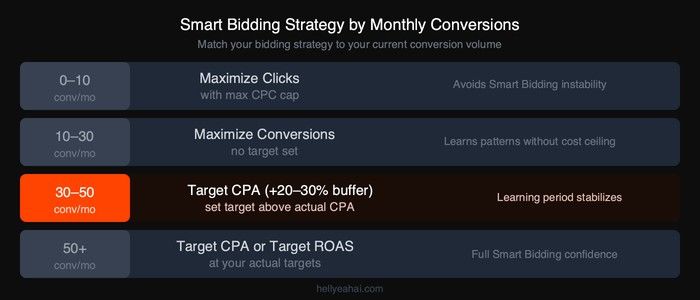
Smart Bidding optimizes based on conversion signals. The fewer conversions your account records per month, the less information the algorithm has to work with, and the more erratic its auction behavior becomes.
Google's guidance suggests a minimum of 50 conversions in the last 30 days for Target CPA to work reliably. Accounts with 30 to 40 monthly conversions can run Target CPA effectively if conversion patterns are consistent. Below 30, the learning period cycles repeatedly as the algorithm fails to stabilize. That cycling costs money. You're paying for learning that never completes.
At 0-10 monthly conversions, use Maximize Clicks with a max CPC bid cap. This prioritizes traffic within a cost ceiling and avoids Smart Bidding instability entirely.
At 10-30 conversions per month, use Maximize Conversions without a target set. This applies Smart Bidding without a specific cost constraint, giving the algorithm more room to find patterns in a limited data set.
At 30-50 conversions per month, use Target CPA, but set the target 20 to 30% higher than your actual CPA. The buffer gives the algorithm room to compete in auctions it would otherwise avoid.
At 50+ conversions per month, Target CPA or Target ROAS at your actual targets.
The RSA connection is direct. An RSA with 15 diverse headlines generates more impression-level data because more combinations get tested across more queries. This gives Smart Bidding more signal to work with. An RSA with 7 similar headlines, even well-performing ones, constrains that signal. Writing distinct headlines isn't just about CTR. It feeds the bidding system.
On tCPA or tROAS campaigns, don't manually override individual keyword bids. Smart Bidding interprets manual overrides as signals and may counteract them over one to two weeks. Adjust the target itself when you need to change the algorithm's aggressiveness.
Accounts connected to the Hellyeah platform have this bidding transition handled automatically. Hellyeah's AIMA engine monitors conversion volume across all connected campaigns and adjusts the active bidding strategy before a learning-period collapse affects performance. See how Hellyeah manages bidding.
Author's Comment
"The data threshold question almost never comes up in RSA guides because the people writing them manage accounts with enough volume that it's never been their problem. At $30/day, you might wait five months before a single asset rating is statistically trustworthy. We built AIMA to compress that timeline by aggregating learning signals across accounts. Your account doesn't have to start from zero every time you make a change."
Jay Ma, Co-Founder, Hellyeah AI
How the Hellyeah Platform Manages RSA Optimization
The core small-budget RSA challenge, not enough volume for statistical confidence in a single account, is hard to solve in isolation. The Hellyeah platform, powered by AIMA, approaches this differently.
AIMA monitors performance signals across all accounts connected to the platform. Patterns that would take a single $1,500/month account six months to accumulate emerge faster when signals across multiple accounts contribute to the model. This is aggregated pattern learning, not data sharing between clients. AIMA uses cross-account signals to inform individual account decisions without exposing any client's campaign data.
For connected accounts, AIMA continuously monitors RSA performance at the asset level rather than on a weekly review schedule, identifies underperforming combinations earlier than account-level data alone would flag, adjusts bidding strategy automatically when conversion volume crosses the thresholds described above, surfaces negative keyword candidates from search term patterns across similar account profiles, and detects RSA disapprovals before impression share is affected.
The structural fundamentals covered above still apply: distinct headlines, minimal pinning, match type discipline. AIMA performs best when the raw materials are well-constructed. What it eliminates is the delay between a problem appearing and a fix being applied.
See how the Hellyeah platform manages Google Ads campaigns.
Related Google Ads Guides
- Google Ads Impression Share: Budget Loss vs Rank Loss Explained
- Google Ads Smart Bidding: When to Use Each Strategy
- How to Cut Wasted Ad Spend Without Pausing Campaigns
- Google Ads Quality Score: What Moves It and What Doesn't
Frequently Asked Questions
How many headlines should a responsive search ad have for a small account?
Start with 8 to 10 distinct headlines across five categories: keyword-match, benefit, trust signal, CTA, and objection-handling. Google recommends 15, which is right for large accounts where the algorithm tests enough combinations to find statistical winners. On small budgets, 8 to 10 well-differentiated headlines give the algorithm enough material without splitting limited impressions across too many untested assets. Distinctness matters more than count.
Should I pin headlines in a responsive search ad?
Pin only when copy must appear for legal, brand, or time-sensitive offer reasons. Each pinned position reduces the combinations Google can test. On small accounts where monthly impressions are already limited, over-pinning slows learning further. If your reason for pinning is that you prefer a headline to appear, that's not sufficient. Let the algorithm surface strong performers through testing.
What is a good Ad Strength score for an RSA?
Target "Good" or "Excellent" as a structural baseline, but don't optimize for Ad Strength directly. The rating measures asset variety and coverage, not conversion performance. Adding a third RSA to ad groups with two at "Good" or "Excellent" is correlated with a 3.7% conversion increase at similar cost per conversion, according to Google's published data. But a "Poor" rated RSA with a tight, keyword-specific set of headlines can outperform an "Excellent" one with generic copy. Use Ad Strength as a setup check, not a performance predictor.
How long should I wait before reviewing RSA performance?
On a $30/day budget, wait at least six weeks before reviewing asset ratings. If total RSA impressions are below 500 at that point, wait another four weeks before making any changes. The combinations report requires at least 200 to 300 impressions per combination to produce meaningful data. Acting earlier means acting on noise.
Can you run multiple RSAs in one ad group on a small budget?
Start with one RSA. Add a second only after the ad group has 300 or more clicks. Adding a third RSA is only appropriate once the group generates 100 or more clicks per week. Below that, three RSAs split an already-limited impression pool and slow learning for all of them. Google's correlation data shows a 3.7% conversion lift from a third RSA, but that figure assumes sufficient volume to begin with.

Co-founder
Co-founder of Hellyeah. Writes about building durable growth loops that compound over time.


